Job Boards
Let’s face it: sorting through job openings across countless websites can be daunting (I mean, you wouldn’t be here if it were easy), but here’s the good news: when used correctly, job boards are one of the best ways to discover fantastic opportunities and get your resume in front of the right people. It’s where you can search for openings and be found by recruiters. It’s a two-way street; if you’re using job boards strategically, you’ll open up an entirely new set of possibilities.
What are job boards, exactly?
Job boards are online platforms where employers post job openings, and candidates—like you—can search for roles that match their skills and interests. They are a central hub for job opportunities across industries, locations, and experience levels.
But job boards do more than just list jobs. They offer customization, tracking tools, and visibility, which make them one of the most effective resources for job seekers. By setting up a complete profile on these platforms, you position yourself where thousands of recruiters search daily.
Why should you use job boards?
They give you access to tons of jobs
Most job boards pull listings from all over the internet, so you can find roles originating from company websites, recruitment agencies, and more—all in one place.
Don’t
Don’t just stick to one job board. Different boards have different listings, so the more you use, the better your chances.
Recruiters can find you even when you’re not applying
Most job boards, including the ones described below, allow recruiters to proactively search for candidates. That means your resume is working for you even when you’re not actively applying.
Don’t
Don’t skip filling out your profile completely. The more details you add, the higher your chances of getting noticed.
You can narrow down your search
Job boards let you filter by things like location, job type, and salary. Many even let you set up alerts to be notified when new jobs matching your criteria are posted.
You can track your applications
Some job boards show you when employers view your application. This helps you know when to follow up or focus your energy elsewhere.
The top job boards for new grads
Here are the six best job boards for recent grads. I’ll walk you through each one, showing you how they work, why they’re useful, and how to get the most out of them.
Don’t
Don’t look for jobs using Google searches. The ratio of scams to real opportunities is high, making it a poor expenditure of valuable time.
1. Indeed: The one with the massive job database
Indeed is one of, if not the, largest job search engines worldwide. It pulls job listings from across the web—including company websites and recruitment agencies—making it a must-use for any job seeker.
Why use it?
It has a massive job database
You’ll find millions of job listings across all industries and job types.
It’s easy to use
You can set up job alerts, apply directly through the platform, and keep track of all your applications in one place.
Recruiters can find you
Keep your profile updated, and employers will be able to find your resume in their searches…and remember: it’s always better to be found for a job than having to find one!
How to use Indeed
- Create an account
- Go to indeed.com and click “Sign In,” then “Create an Account.”
- You can register with your email or with your Google or Apple account.
- Once you’re signed up, upload your resume or build one using Indeed’s resume builder.
- Search for jobs
- Use the search bar to enter specific job titles, like “Marketing Coordinator” or “Software Developer.”
- Narrow your results using filters for job type (full-time, part-time, internship), location, and salary.
- Save jobs you like so you can apply later.
- Set up job alerts
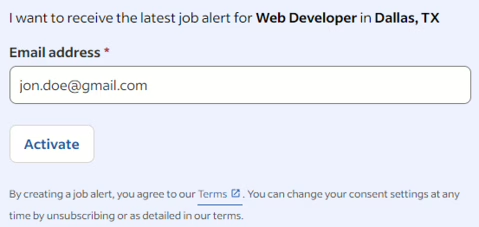
- After refining your search, scroll to the bottom of the results page and enter your email in the blue box (see below).
- Click “Activate” to get email notifications when new jobs that match your criteria are posted.
- Track your applications
- When you apply for jobs, you can track whether employers have viewed your application.
- If an employer views your resume but doesn’t reach out, send a polite follow-up email to express your continued interest.
Insider Tip
Refresh your resume regularly. Recruiters tend to see resumes that have been recently updated, so don’t let yours gather dust.
2. LinkedIn: The best for professional networking and jobs
LinkedIn is not just for networking—it’s also a powerful job search platform. Many employers post job openings exclusively on LinkedIn, and recruiters actively search profiles to find candidates.
Why use it?
It’s great for networking
LinkedIn isn’t just about job searching—you can connect with professionals in your industry, follow companies, and engage with thought leaders.
You’ll get personalized job recommendations
Based on your profile, LinkedIn suggests jobs that match your skills and experience.
Employers can find you
A complete, optimized profile doubles as your resume, making it easy for recruiters to spot you.
Insider Tip
Some company pages on LinkedIn will include an “I’m interested” feature. Use it to get on their radar!
How to use LinkedIn (as a job board)
- Optimize your profile
- Head to linkedin.com and make sure your LinkedIn profile is fully filled out. Treat it like an online resume.
- Include your experience, skills, certifications, and a professional-looking photo.
- Search for jobs
- Use the “Jobs” tab at the top of the page to search for openings by title, location, and industry.
- Narrow your results using filters for experience level, job type, and company size.
- Set up job alerts
- After you’ve searched for a job, you can turn the “Set alert” button on (see below) to get notified when similar jobs are posted.
- You’ll get notifications directly on LinkedIn or via email, depending on your preference.
- Apply using “Easy Apply”
- Many jobs on LinkedIn allow you to apply with just one click using your LinkedIn profile.
- Make sure your profile is complete and matches the job you’re applying for.

Insider Tip
Engage with companies you’re interested in by following them and commenting on their posts. This increases your visibility and helps you stand out to recruiters.
3. Handshake: Perfect for students and recent grads
Handshake is explicitly designed for students and recent graduates. It partners with universities to help connect you with employers looking for young talent.
Why use it?
It’s made for students and grads
Employers posting on Handshake know they’re hiring entry-level talent, so the roles are likely a great match for your experience level.
It’s connected to your school
Handshake is linked to many college career centers, meaning you’ll have access to job fairs, workshops, and events specifically for your school.
Exclusive listings
Many employers post roles on Handshake that you won’t find anywhere else.
How to use Handshake
- Create an account
- Head over to joinhandshake.com and sign up using your school email if your university partners with the platform.
- Complete your profile with your education, skills, and work experience.
- Search for jobs
- Use the search bar to find internships, part-time jobs, and entry-level positions.
- Apply filters like job type, location, and industry to refine your search.
- Set up alerts
- Save your searches and get email notifications when new jobs matching your preferences are posted.
- Apply for jobs
- Apply directly through Handshake using your profile or uploaded resume. Many employers will also allow you to attach a cover letter.
Insider Tip
Follow employers you’re interested in and keep an eye out for virtual or on-campus events where you can network with recruiters.
4. CareerBuilder: A solid choice for entry-level jobs
CareerBuilder has been around for a long time and remains a trusted platform for finding a variety of job listings. It offers a wide range of tools to help job seekers, from a resume builder to salary insights.
Why use it?
It’s great for finding entry-level roles
CareerBuilder is full of listings for internships, part-time work, and entry-level jobs across industries.
It has career development tools
Use CareerBuilder’s resume builder, salary calculator, and skill assessments to boost your applications.
You can apply right on the platform
No need to navigate away from the site—many jobs let you apply directly through CareerBuilder.
How to use CareerBuilder
- Create an account
- Visit careerbuilder.com and sign up with your email.
- Upload your resume and then complete your profile.
- Search for jobs
- Under the “Jobs” tab, use the search bar to look for roles by title, location, and industry.
- Apply filters like job type, salary range, and experience level to refine your results.
- Set up alerts
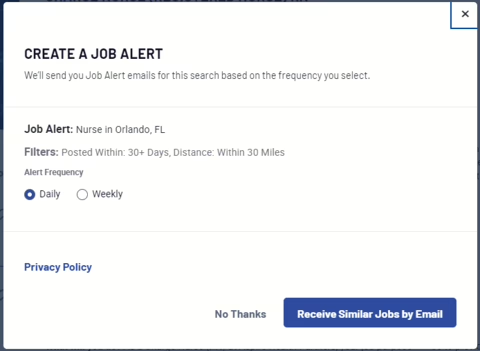
- Once you’ve created a search, save it and opt to receive email alerts (see below) when new listings that match your criteria are posted.
- Apply for jobs
- Apply directly through the platform using your uploaded resume and a cover letter.
Insider Tip
Use CareerBuilder’s salary calculator to know what’s realistic before negotiating a salary.
5. Glassdoor: Get the inside scoop before you apply
Glassdoor isn’t just a job board—it’s also a platform that lets you read reviews from current and former employees, check company ratings, and compare salaries.
Why use it?
You get a behind-the-scenes look
Before applying, you can read real employee reviews about company culture, management, and work-life balance.
It has salary data
Glassdoor offers detailed salary info, which helps you negotiate or make informed decisions about your applications.
You can check out interview insights
Learn about the interview questions candidates have been asked before you go in.
How to use Glassdoor
- Create an account
- Head to glassdoor.com and sign up using your email or Google account.
- Complete your profile with your job preferences, education, and resume.
- Search for jobs
- Under the “Jobs” tab, use the search bar to find roles by title, company, or location.
- Filter results based on job type, salary, and company ratings.
- Set up job alerts
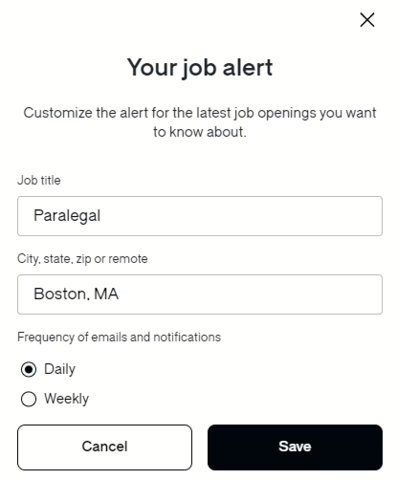
- Once you’ve done a search, click “Create job alert” (see below) to be notified when new roles are posted.
- Apply and check company reviews
- Apply directly through Glassdoor or on the company’s website. But before you apply, check out the company’s reviews and salary data to make sure it’s the right fit for you.
Insider Tip
When using Glassdoor, click on the “Interviews” section of a company’s page to see examples of questions you might be asked during an interview.
Don’t
Don’t believe everything you read on Glassdoor. While it presents an opportunity to gain genuine insight into a company, former employees commonly use the site to disparage the company anonymously.
6. ZipRecruiter: Smart matching technology that works for you
ZipRecruiter uses AI-powered matching to connect you with jobs that fit your experience and skills. It’s fast, easy to use, and sends real-time updates when an employer views your application.
Why use it?
It uses AI to match you with jobs
ZipRecruiter’s technology does a lot of the heavy lifting, suggesting roles based on your profile that you might not have thought of.
One-click apply makes it quick and easy
You can apply for jobs with a single click once your resume is uploaded.
Real-time notifications
You’ll know when employers view your resume so you can follow up accordingly.
How to use ZipRecruiter
- Create an account
- Head over to ziprecruiter.com and sign up using your email.
- Complete your profile and upload your resume.
- Search for jobs
- Use the search bar to find roles by title, industry, or location.
- Apply filters to narrow down your search by job type and salary range.
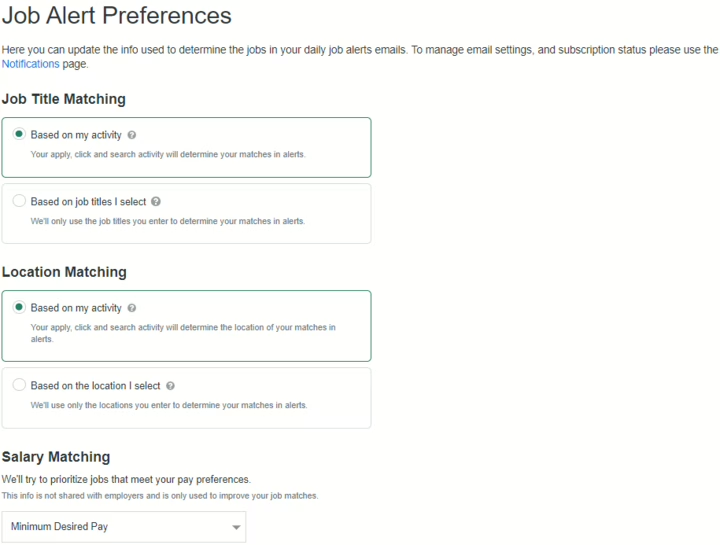
- Set up alerts
- Select “Job Alerts” under the settings icon at the top of the page on the right.
- You can opt to receive notifications when new jobs matching your preferences are posted (see below).
- Apply using one-click apply
- When you find a job you like, hit “1-Click Apply” to instantly submit your resume.
- Track your applications
- ZipRecruiter sends real-time updates when an employer views your application. If they don’t reach out after viewing your resume, send a follow-up message.
Insider Tip
Follow up on real-time notifications when your resume is viewed. It shows initiative and can help keep you top of mind with recruiters.
Key Takeaways
- Use all the resources available: Don’t just browse listings—use the resume builders, salary calculators, and company reviews to improve your chances.
- Job boards open doors: They provide access to millions of opportunities across industries and allow recruiters to find you.
- Tailor your approach: Use job filters and set up alerts to make sure you see relevant listings.
- Track your progress: Use features like application tracking to follow up with employers.