Creating Your Profile
After your resume, LinkedIn is the best tool to showcase your experience and professional goals. It’s where you can connect with peers and senior professionals, get noticed by recruiters, and stay updated on the companies you want to work for.
If you’ve already created a LinkedIn profile, great! You’re ahead of the game, but I still recommend reviewing the steps below to ensure you’re getting everything out of it.
Step 1: Create an account
Before building your profile, you need to set up a LinkedIn account.
- Go to LinkedIn.com and sign up with your email address
- Choose a strong password, and don’t forget to verify your email to complete your initial setup
Step 2: Choose the perfect profile photo
Your profile photo is one of the first things people see, so it’s important to make a great first impression.
Picking the right headshot:
- Use a high-quality photo with a plain background
- Wear professional attire and make sure your face is clearly visible

Insider Tip
Smile—it makes you look approachable and more engaging.
Don’t
Don’t use selfies or photos with other people in them.
Step 3: Enhance your profile with a cover photo
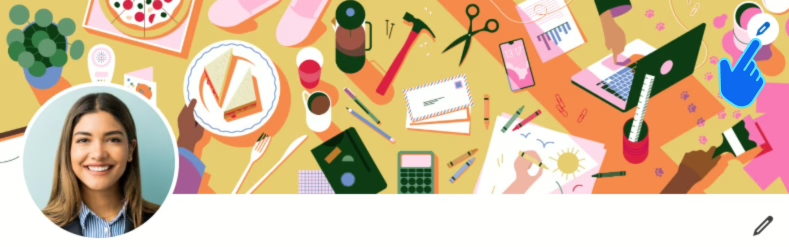
The cover photo is the large horizontal banner at the top of your profile. While using LinkedIn’s default image is acceptable, you can add a personalized cover photo to make your profile more engaging.
Choosing a cover photo:
- Use a high-quality image of your college campus or one that represents your industry
- Consider using a related photo if you have participated in notable projects or events
- Use a properly sized image (1584 x 396 pixels) for optimal display
Insider Tip
A photo of your graduation or a significant campus landmark can highlight your academic achievements and connection to your alma mater. You can find great images online without having to take them yourself!
Don’t
Don’t use images that are blurry, pixelated, or unrelated to your academic or professional journey.
Step 4: Craft a compelling headline
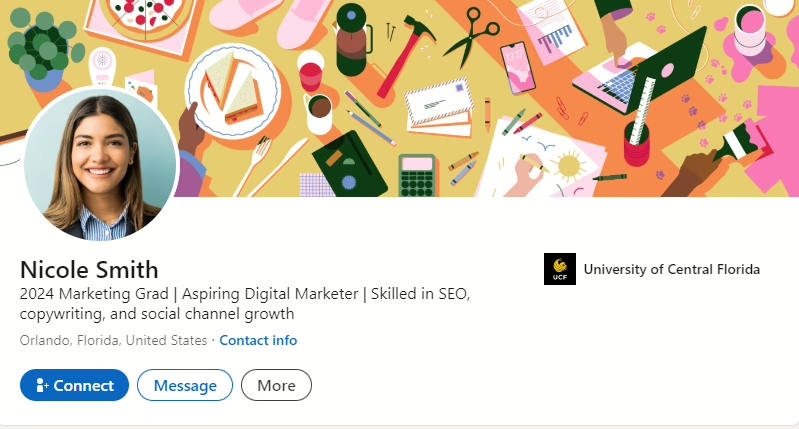
Your headline is the first piece of text recruiters and connections will see. It needs to reflect your career goals and skills.
Keys to a strong headline:
- Indicate that you’re a recent grad
- Describe your desired role
- Highlight a few key skills that align with your career aspirations
Don’t
Don’t use generic headlines like “Recent Graduate Looking for Opportunities” – the goal is for your headline to make the reader immediately aware of who you are professionally.
Step 5: Write a captivating About section
This is your elevator pitch. Use this space to highlight your academic achievements, key skills, and professional aspirations.
Formulating a solid About message:
- Summarize your academic background, relevant skills, and career goals in a few sentences
- Use keywords related to your desired industry and/or job title
Insider Tip
Limit your about section to three sentences. One to describe your background (indicating you’re a recent grad), one to highlight your strengths, and one to state your immediate career objective.
Step 6: Detail your experience
Detailing your experiences provides evidence of your skills and accomplishments.
When listing experience:
- Include internships, part-time jobs, volunteer work, and relevant school projects
- Use action verbs and quantify your contributions
Don’t
Don’t list basic duties without highlighting what you achieved in each role.
Step 7: Highlight your education
Your education is one of your biggest assets as a new grad, so thoroughly complete this section on your profile.
Presenting your educational background:
- Include your degree, major, university, and graduation year
- Mention any honors or awards like Dean’s List or extracurricular leadership roles
Step 8: List your skills
Listing your skills helps recruiters quickly see if you have the right qualifications for the role.
Selecting your skills:
- Include both technical and soft skills that apply to your desired job
- Add keywords from job descriptions to match recruiters’ searches
Insider Tip
You can add up to 100 skills, so take advantage of selecting all that apply to your search. Candidates who list skills receive significantly more profile views than those who don’t!
Don’t
Don’t clutter this section with skills unrelated to your career goals.
Step 9: Secure recommendations
Recommendations from professors, supervisors, or colleagues can boost your credibility.
Asking for recommendations:
- Reach out to professors, internship supervisors, or colleagues you’ve worked closely with
- Provide context on what you’d like them to highlight, such as teamwork, leadership, or technical skills
Insider Tip
You can send a polite, concise LinkedIn message requesting a recommendation, ensuring you mention what specific aspects of your work they might focus on.
Step 10: Customize your URL
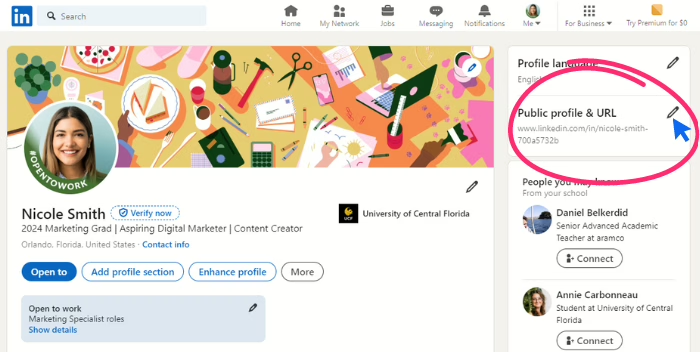
A custom LinkedIn URL is easier to share and looks more professional.
Creating a custom URL:
Go to your profile settings and create a custom URL with your name. If your name is already taken, try using your middle name (or initial), an abbreviation of your name, a hyphen (-), or a favorite number.
Key Takeaways
- First impressions matter: A professional photo and strong headline set the tone for your profile.
- Highlight your skills: Use industry-specific keywords in your About section and skills list to get noticed.
- Quantify achievements: Wherever possible, add measurable results to your experience to show your impact.
- Get recommendations: Leverage your network to build credibility with strong recommendations.
- Custom URL: Create a custom LinkedIn URL to make it easy to share and look more polished.